Amazon 验证码
概述
Amazon 验证码是亚马逊用于保护其网站免受机器人和自动化活动侵害的身份验证系统。这是一种特殊扭曲的文本验证码,仅出现在亚马逊系统上。
🛒
Amazon 验证码通常在登录、产品搜索或当亚马逊检测到您的IP地址存在异常行为时出现。
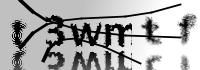
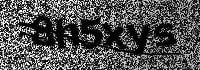
1. 创建请求
请求
POST https://api.achicaptcha.com/createTask
参数
| 参数名称 | 数据类型 | 是否必需 | 描述 |
|---|---|---|---|
clientKey | string | 是 | API密钥 |
task.type | string | 是 | ImageToTextTask |
task.image | string | 是 | Amazon验证码图片的base64编码 |
task.subType | string | 是 | amazon |
请求示例
POST /createTask HTTP/1.1
Host: api.achicaptcha.com
Content-Type: application/json

{
  "clientKey": "YOUR_API_KEY",
  "task": {
    "type": "ImageToTextTask",
    "image": "base64 encoded Amazon captcha image",
    "subType": "amazon"
  }
}
响应
成功时,服务器返回 errorId = 0 和 taskId
{
  "errorId": 0,
  "taskId": "f2fc70d6-c76b-4fba-9480-205ac1fe9fb9"
}
2. 获取结果
请求
POST https://api.achicaptcha.com/getTaskResult
参数
| 参数名称 | 数据类型 | 是否必需 | 描述 |
|---|---|---|---|
clientKey | string | 是 | API密钥 |
taskId | string | 是 | 从(1)获取的TaskId |
请求示例
POST /getTaskResult HTTP/1.1
Host: api.achicaptcha.com
Content-Type: application/json

{
  "clientKey": "YOUR_API_KEY",
  "taskId": "f2fc70d6-c76b-4fba-9480-205ac1fe9fb9"
}
响应
{
  "errorId": 0,
  "status": "ready",
  "solution": "KCXM8P"
}
状态说明
errorId = 0且status = ready:成功解决,在solution中读取结果errorId = 0且status = processing:正在解决验证码,等待2秒后重试errorId > 0:系统错误,返回错误代码和描述
集成示例
import requests
import time
import base64

def solve_amazon_captcha(image_path, api_key='YOUR_API_KEY'):
    # 读取并编码图片
    with open(image_path, 'rb') as image_file:
        image_base64 = base64.b64encode(image_file.read()).decode('utf-8')

    # 步骤1:创建任务
    create_task_url = 'https://api.achicaptcha.com/createTask'
    create_task_payload = {
        'clientKey': api_key,
        'task': {
            'type': 'ImageToTextTask',
            'image': image_base64,
            'subType': 'amazon'
        }
    }

    response = requests.post(create_task_url, json=create_task_payload)
    result = response.json()

    if result['errorId'] != 0:
        raise Exception(result['errorDescription'])

    task_id = result['taskId']

    # 步骤2:获取结果
    get_result_url = 'https://api.achicaptcha.com/getTaskResult'

    while True:
        time.sleep(2)  # 等待2秒

        get_result_payload = {
            'clientKey': api_key,
            'taskId': task_id
        }

        response = requests.post(get_result_url, json=get_result_payload)
        result = response.json()

        if result['errorId'] != 0:
            raise Exception(result['errorDescription'])

        if result['status'] == 'ready':
            return result['solution']

        # 如果 status == 'processing',继续循环

# 使用方法
solution = solve_amazon_captcha('amazon_captcha.png', 'YOUR_API_KEY')
print('Amazon验证码结果:', solution)
常见错误代码
| 错误代码 | 描述 | 备注 |
|---|---|---|
| 0 | 成功 | 成功 |
| 1 | 处理中 | 处理中 |
| 2 | 缺少必填字段 | 缺少必填字段,请再次检查参数 |
| 3 | 不支持的任务 | 不支持的任务类型 |
| 4 | 任务创建失败 | 任务创建失败 |
| 5 | 客户端密钥不存在 | API密钥不存在,请再次检查API密钥 |
| 6 | 账户余额不足 | 账户余额不足,请充值 |
| 7 | 任务失败,请创建新任务 | 任务失败,请创建新任务 |
| 8 | 任务ID不存在 | 任务ID不存在 |
最佳实践
为了在使用Achicaptcha API时获得最佳结果,请遵循以下原则:
1. 图片质量
- 使用高分辨率图片
- 确保图片不过于模糊或有噪点
- 正确捕获或裁剪Amazon验证码区域
2. 轮询间隔
- 在结果检查之间至少等待2秒
- 不要用过多连续请求轰炸API
- 设置超时以避免无限循环
3. 重试逻辑
- 对临时错误(如
ERROR_NO_SLOT_AVAILABLE)实施重试 - 重试时使用指数退避
- 限制最大重试次数
4. API密钥安全
- 不要在代码中硬编码API密钥
- 使用环境变量
- 不要在客户端暴露API密钥
有用的链接: