Temu Grid Captcha
Overview
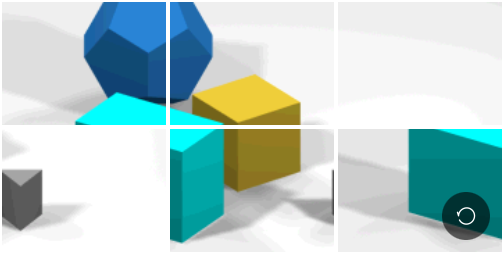
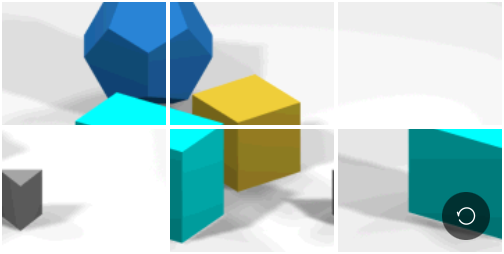
Temu Grid Captcha is a grid selection captcha: the page shows a grid of tiles and the solver must return which cells to click (0-based indices, row-major: left-to-right, top-to-bottom).
🔲
The task.image field encodes the grid image as a single Base64 string. No additional other field is needed.
1. Create Task
Image Submission Format
Grid image
Request
POST https://api.achicaptcha.com/createTask
Parameters
| Parameter Name | Data Type | Required? | Description |
|---|---|---|---|
clientKey | string | yes | API key |
task.type | string | yes | GridCaptcha |
task.subType | string | yes | temu |
task.image | string | yes | Base64-encoded grid image |
Request Example
POST /createTask HTTP/1.1
Host: api.achicaptcha.com
Content-Type: application/json

{
  "clientKey": "YOUR_API_KEY",
  "task": {
    "type": "GridCaptcha",
    "subType": "temu",
    "image": "BASE64_GRID_IMAGE"
  }
}
Response
When successful, server returns errorId = 0 and taskId
{
  "errorId": 0,
  "taskId": "a1b2c3d4-e5f6-7890-abcd-ef1234567890"
}
2. Get Result
Request
POST https://api.achicaptcha.com/getTaskResult
Parameters
| Parameter Name | Data Type | Required? | Description |
|---|---|---|---|
clientKey | string | yes | API key |
taskId | string | yes | TaskId obtained from step (1) |
Request Example
POST /getTaskResult HTTP/1.1
Host: api.achicaptcha.com
Content-Type: application/json

{
  "clientKey": "YOUR_API_KEY",
  "taskId": "a1b2c3d4-e5f6-7890-abcd-ef1234567890"
}
Response
{
  "errorId": 0,
  "status": "ready",
  "solution": {
    "click": "0,2,5"
  }
}
solution.click is a comma-separated string of 0-based cell indices (row-major) to click in the grid.
Status Explanation
errorId = 0andstatus = ready: Successfully solved, read cell indices insolution.clickerrorId = 0andstatus = processing: Still solving, wait 2 seconds and poll againerrorId > 0: System error, checkerrorCodeanderrorDescription
Integration Examples
import requests
import base64
import time

def solve_temu(grid_path, api_key='YOUR_API_KEY'):
    with open(grid_path, 'rb') as f:
        grid_b64 = base64.b64encode(f.read()).decode()

    # Step 1: Create task
    create_resp = requests.post(
        'https://api.achicaptcha.com/createTask',
        json={
            'clientKey': api_key,
            'task': {
                'type': 'GridCaptcha',
                'subType': 'temu',
                'image': grid_b64
            }
        }
    )
    result = create_resp.json()

    if result['errorId'] != 0:
        raise Exception(result['errorDescription'])

    task_id = result['taskId']

    # Step 2: Poll for result
    while True:
        time.sleep(2)
        poll_resp = requests.post(
            'https://api.achicaptcha.com/getTaskResult',
            json={'clientKey': api_key, 'taskId': task_id}
        )
        result = poll_resp.json()

        if result['errorId'] != 0:
            raise Exception(result['errorDescription'])

        if result['status'] == 'ready':
            return result['solution']['click']  # e.g. "0,2,5"

# Usage
indices = solve_temu('grid.jpg', 'YOUR_API_KEY')
print('Cells to click:', indices)
Common Error Codes
| Error Code | Description | Notes |
|---|---|---|
| 0 | success | Success |
| 1 | processing | Processing |
| 2 | missing required fields | Missing required fields, check parameters again |
| 3 | task not supported | Task type not supported |
| 4 | task creation failed | Task creation failed |
| 5 | client key does not exist | API key does not exist, check API key again |
| 6 | insufficient account balance | Insufficient account balance, add more credits |
| 7 | task failed, please create a new task | Task failed, please create a new task |
| 8 | task ID does not exist | Task ID does not exist |
Best Practices
For best results when using Achicaptcha API for Temu Grid Captcha, follow these principles:
1. Image Encoding
- Send only the grid image as a single Base64 string
- Do not include the
data:image/...;base64,prefix — raw Base64 only - Ensure the image is fully loaded and encoded before sending
2. Polling Interval
- Wait at least 2 seconds between result checks
- Do not spam the API with consecutive requests
- Set a timeout to avoid infinite loops (recommended: 60 seconds)
3. Result Processing
solution.clickis a comma-separated string of 0-based cell indices (row-major, left-to-right, top-to-bottom)- Split by
,and convert to integers before clicking the corresponding grid cells
4. Retry Logic
- Implement retry for temporary errors like
ERROR_NO_SLOT_AVAILABLE - Use exponential backoff when retrying
- Limit the maximum number of retry attempts
5. API Key Security
- Do not hardcode your API key in source code
- Use environment variables or a secrets manager
- Never expose the API key on the client side
Useful links: