Geetest Image Captcha
Overview
Geetest is a popular captcha system in China and Asian countries, using interactive challenges such as puzzle dragging and image recognition. We provide services to solve all types of Geetest Image (Geetest v3, Geetest v4, ...) on browsers, simulators, and phone farms.
This documentation guides you through handling Geetest Captcha which requires users to identify and click on objects in sequence on the background image. For drag-type captcha, please follow the instructions for Tiktok Captcha drag type.
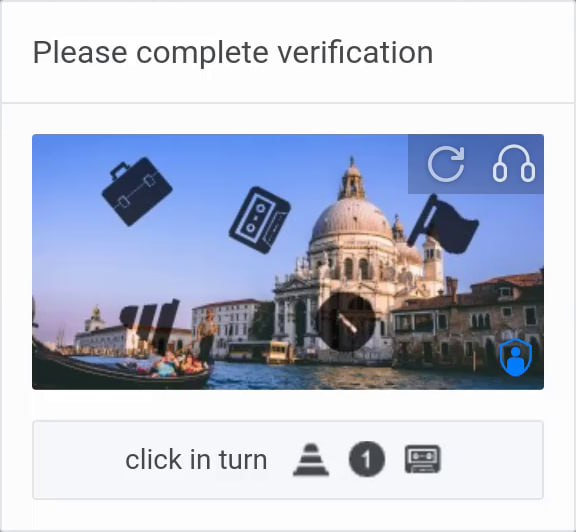
1. Create Task
Image Submission Format
Separate icon images and background images as shown below
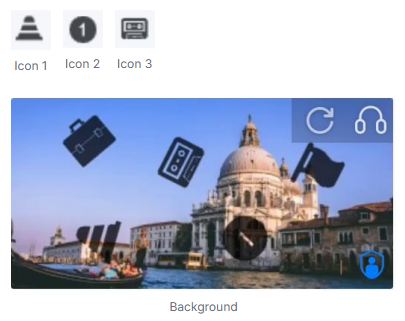
Request
POST https://api.achicaptcha.com/createTask
Parameters
| Parameter Name | Data Type | Required? | Description |
|---|---|---|---|
clientKey | string | yes | Api key |
task.type | string | yes | GeetestImageCaptchaTask |
task.image | string | yes | List of base64 images following the principle: icon_1|icon_2|...|icon_n|background (Base64 strings separated by |) |
task.subType | string/int | yes | Captcha type: 3: Grid image, 7: Select objects in order, "icon_crush": Icon crush, "slider": Drag slider |
Request Example
POST /createTask HTTP/1.1
Host: api.achicaptcha.com
Content-Type: application/json

{
  "clientKey": "YOUR_API_KEY",
  "task": {
    "type": "GeetestImageCaptchaTask",
    "image": "/9j/4AAQSkZJRgABAQEASABIAAD/2wBDAAMCAgMCAgMDAwMEAwMEBQgFBQQEBQoHBwYIDAoMDAsKCwsNDhIQDQ4RDgsLEBYQERMUFRUVDA8XGBYUGBIUFRT...|/9j/4AAQSkZJRgABAQEASABIAAD/2wBDAAMCAgMCAgMDAwMEAwMEBQgFBQQEBQoHBwYIDAoMDAsKCwsNDhIQDQ4RDgsLEBYQERMUFRUVDA8XGBYUGBIUFRT...|/9j/4AAQSkZJRgABAQEASABIAAD/2wBDAAMCAgMCAgMDAwMEAwMEBQgFBQQEBQoHBwYIDAoMDAsKCwsNDhIQDQ4RDgsLEBYQERMUFRUVDA8XGBYUGBIUFRT...",
    "subType": 7
  }
}Note: The image parameter must be a base64 string of icon and background images, separated by |. Order: icon_1|icon_2|icon_3|...|background
- subType
3(Grid Image): Send icon image + grid background image — the result returns cell indices to select (e.g.1,3,5). - subType
7(Object Selection): Send icon images + background — click matching objects on the background in the displayed order. - subType
"icon_crush"(Icon Crush): Send a reference icon + grid image — click all grid cells that match the reference icon. - subType
"slider"(Drag Slider): Send background image — the result returns the x offset to drag the slider.
Response
When successful, server returns errorId = 0 and taskId
{
  "errorId": 0,
  "taskId": "f2fc70d6-c76b-4fba-9480-205ac1fe9fb9"
}
2. Get Result
Request
POST https://api.achicaptcha.com/getTaskResult
Parameters
| Parameter Name | Data Type | Required? | Description |
|---|---|---|---|
clientKey | string | yes | Api key |
taskId | string | yes | TaskId obtained from (1) |
Request Example
POST /getTaskResult HTTP/1.1
Host: api.achicaptcha.com
Content-Type: application/json

{
  "clientKey": "YOUR_API_KEY",
  "taskId": "f2fc70d6-c76b-4fba-9480-205ac1fe9fb9"
}
Response
{
  "errorId": 0,
  "status": "ready",
  "solution": "x1,y1,x2,y2,x3,y3"
}
Status Explanation
errorId = 0andstatus = ready: Successfully solved, read result insolutionerrorId = 1andstatus = processing: Solving captcha, wait 1-2 seconds and try againerrorIdother than 0 and 1: System error, returns error code and description
Result Meaning
solution: Return value depends onsubType:- subType
3(Grid Image): Cell indices to select, formati1,i2,...(e.g.1,3,5) — index starts at 1, left-to-right, top-to-bottom - subType
7(Object Selection): Pixel coordinatesx1,y1,x2,y2,...— click in the order corresponding to displayed icons - subType
"icon_crush"(Icon Crush): Pixel coordinates of all matching icons to crush — click each regardless of order - subType
"slider"(Drag Slider): X offset in pixels to drag the slider piece
- subType
Integration Examples
import requests
import time

def solve_geetest_image(base64_images, sub_type=7, api_key='YOUR_API_KEY'):
    # base64_images: "icon1|icon2|icon3|background" - base64 string separated by |

    # Step 1: Create task
    create_task_url = 'https://api.achicaptcha.com/createTask'
    create_task_payload = {
        'clientKey': api_key,
        'task': {
            'type': 'GeetestImageCaptchaTask',
            'image': base64_images,
            'subType': sub_type
        }
    }

    response = requests.post(create_task_url, json=create_task_payload)
    result = response.json()

    if result['errorId'] != 0:
        raise Exception(result['errorDescription'])

    task_id = result['taskId']

    # Step 2: Get result
    get_result_url = 'https://api.achicaptcha.com/getTaskResult'

    while True:
        time.sleep(2)  # Wait 2 seconds

        get_result_payload = {
            'clientKey': api_key,
            'taskId': task_id
        }

        response = requests.post(get_result_url, json=get_result_payload)
        result = response.json()

        if result['errorId'] not in [0, 1]:
            raise Exception(result['errorDescription'])

        if result['status'] == 'ready':
            return result['solution']  # "x1,y1,x2,y2,x3,y3"

        # If status == 'processing', continue loop

# Usage
# Assume you have base64 images
icon1_base64 = '/9j/4AAQSkZJRgABAQEASABIAAD...'
icon2_base64 = '/9j/4AAQSkZJRgABAQEASABIAAD...'
icon3_base64 = '/9j/4AAQSkZJRgABAQEASABIAAD...'
background_base64 = '/9j/4AAQSkZJRgABAQEASABIAAD...'

base64_images = f'{icon1_base64}|{icon2_base64}|{icon3_base64}|{background_base64}'
solution = solve_geetest_image(base64_images, 7, 'YOUR_API_KEY')
print('Geetest coordinates:', solution)  # "x1,y1,x2,y2,x3,y3"

# Parse coordinates and use
coords = [int(c) for c in solution.split(',')]
for i in range(0, len(coords), 2):
    x, y = coords[i], coords[i + 1]
    print(f'Click at ({x}, {y})')
    # Perform click at coordinates (x, y)
Common Error Codes
| Error Code | Description | Notes |
|---|---|---|
| 0 | success | Success |
| 1 | processing | Processing |
| 2 | missing required fields | Missing required fields, check parameters again |
| 3 | task not supported | Task type not supported |
| 4 | task creation failed | Task creation failed |
| 5 | client key does not exist | API key does not exist, check API key again |
| 6 | insufficient account balance | Insufficient account balance, add more credits |
| 7 | task failed, please create a new task | Task failed, please create a new task |
| 8 | task ID does not exist | Task ID does not exist |
Best Practices
For best results when using Achicaptcha API for Geetest Image, follow these principles:
1. Prepare Images in Correct Format
- All images must be encoded to base64
- Image order:
icon_1|icon_2|...|icon_n|background - Base64 images are separated by
|character - Ensure background image is the last in the string
- For subType
3(Grid Image): send icon image + grid background, formaticon|background - For subType
7(Object Selection): send icons + background, formaticon_1|icon_2|...|background - For subType
"icon_crush": send reference icon + grid background, formaticon|background - For subType
"slider": send background image only as a single base64 string
2. Use Results Correctly
- Result returned is a coordinate string:
x1,y1,x2,y2,x3,y3,... - Each pair (x, y) is pixel coordinates on the background image
- For subType
3(Grid Image): result is cell indices (1-based) — tap the grid cells at those positions - For subType
7(Object Selection): click coordinates in the order corresponding to displayed icons - For subType
"icon_crush": click all returned coordinates — order does not matter - For subType
"slider": drag the slider piece by the returned x offset in pixels - Click precisely at coordinates to complete captcha
3. Polling Interval
- Wait at least 1-2 seconds between result checks
- Don't spam API with too many consecutive requests
- Set timeout to avoid infinite loops (recommended 60 seconds)
4. Error Handling
- Check
errorId = 1for processing status - Retry for temporary errors (errorId = 6, 7)
- Create new task if current task fails
- Limit maximum retry attempts
5. API Key Security
- Don't hardcode API key in code
- Use environment variables
- Don't expose API key on client-side
- Make API calls from backend/server
Useful links: