hCAPTCHA Image
Overview
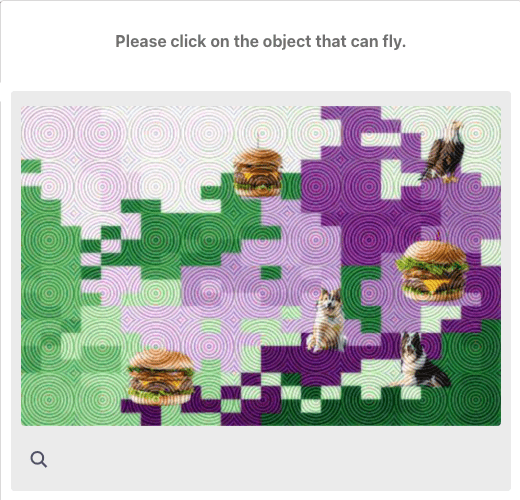
hCaptcha Image is a captcha type that requires users to identify and select images according to requirements, click points, or drag images.
🖼️
hCaptcha Token is widely used on many websites such as Cloudflare, Discord, OpenSea and many other services to protect against bots.
1. Create Task
Request
POST https://api.achicaptcha.com/createTask
Parameters
| Parameter Name | Data Type | Required? | Description |
|---|---|---|---|
clientKey | string | yes | Api key |
task.type | string | yes | HCaptchaImageTask |
task.subType | string | yes | Value equals 0 |
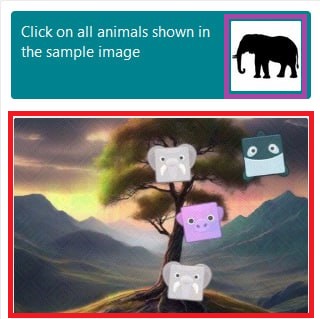
task.image | string | yes | List of base64 images separated by |base64_question1|base64_question2|...|base64_question9|base64_sample1|base64_sample2|...|base64_sampleNNote: Sample images may or may not be present. Images must be encoded to base64 |
task.other | string | yes | Question|Image count|Captcha type Example: "Please identify and click on all pictures featuring a bird|9|grid"- Question: "Please identify and click on all pictures featuring a bird" - Image count: 9 (Only count images in question grid, not sample images)- Captcha type: grid (select cells in 9 cells that meet condition) or bbox (click one/multiple points or drag to mark an object that meets condition) or drag (drag one/multiple puzzle pieces to create complete image) |
Request Example
POST /createTask HTTP/1.1
Host: api.achicaptcha.com
Content-Type: application/json

{
  "clientKey": "YOUR_API_KEY",
  "task": {
    "type": "HCaptchaImageTask",
    "subType": "0",
    "image": "iVBORw0KGgoAAAANSUhEUgAAAAEAAAABCAYAAAAfFcSJAAAADUlEQVR42mNk+M9QDwADhgGAWjR9awAAAABJRU5ErkJggg==|iVBORw0KGgoAAAANSUhEUgAAAAEAAAABCAYAAAAfFcSJAAAADUlEQVR42mNk+M9QDwADhgGAWjR9awAAAABJRU5ErkJggg==|...(9 base64 images joined by |)",
    "other": "Please identify and click on all pictures featuring a bird|9|grid"
  }
}
Response
When successful, server returns errorId = 0 and taskId
{
  "errorId": 0,
  "taskId": "f2fc70d6-c76b-4fba-9480-205ac1fe9fb9"
}
Image Samples to Send to Captcha Solving Server
Tip: For best captcha recognition quality, crop your image as shown in the red and purple boxes in the sample images below.
Make sure the cropped image resolution remains at least 500–600 pixels wide/high to ensure best results.
2. Get Result
Request
POST https://api.achicaptcha.com/getTaskResult
Parameters
| Parameter Name | Data Type | Required? | Description |
|---|---|---|---|
clientKey | string | yes | Api key |
taskId | string | yes | TaskId obtained from (1) |
Request Example
POST /getTaskResult HTTP/1.1
Host: api.achicaptcha.com
Content-Type: application/json

{
  "clientKey": "YOUR_API_KEY",
  "taskId": "f2fc70d6-c76b-4fba-9480-205ac1fe9fb9"
}
Response
{
  "errorId": 0,
  "status": "ready",
  // solution: coordinates of points to click (x1,y1,x2,y2,...)
  "solution": "20,30,40,50"
}
Status Explanation
errorId = 0andstatus = ready: Successfully solved, read result insolution.gRecaptchaResponseerrorId = 0andstatus = processing: Solving captcha, wait 2 seconds and try againerrorId > 0: System error, returns error code and description
Integration Examples
import requests
import time
import base64

def image_url_to_base64(url):
    """Convert image URL to base64"""
    response = requests.get(url)
    return base64.b64encode(response.content).decode('utf-8')

def solve_hcaptcha_image(image_base64_list, question, image_count, captcha_type, api_key='YOUR_API_KEY'):
    # Step 1: Create task
    create_task_url = 'https://api.achicaptcha.com/createTask'
    create_task_payload = {
        'clientKey': api_key,
        'task': {
            'type': 'HCaptchaImageTask',
            'subType': '0',
            'image': image_base64_list,
            'other': f'{question}|{image_count}|{captcha_type}'
        }
    }

    response = requests.post(create_task_url, json=create_task_payload)
    result = response.json()

    if result['errorId'] != 0:
        raise Exception(result['errorDescription'])

    task_id = result['taskId']

    # Step 2: Get result
    get_result_url = 'https://api.achicaptcha.com/getTaskResult'

    while True:
        time.sleep(2)  # Wait 2 seconds

        get_result_payload = {
            'clientKey': api_key,
            'taskId': task_id
        }

        response = requests.post(get_result_url, json=get_result_payload)
        result = response.json()

        if result['errorId'] != 0:
            raise Exception(result['errorDescription'])

        if result['status'] == 'ready':
            return result['solution']['gRecaptchaResponse']

        # If status == 'processing', continue loop

# Usage
# Convert image URLs to base64
image_urls = [
    'https://example.com/image1.jpg',
    'https://example.com/image2.jpg',
    # ... other images
    'https://example.com/image9.jpg'
]

base64_images = [image_url_to_base64(url) for url in image_urls]
image_base64_list = '|'.join(base64_images)

question = 'Please identify and click on all pictures featuring a bird'
image_count = 9
captcha_type = 'grid'  # or 'bbox'

token = solve_hcaptcha_image(image_base64_list, question, image_count, captcha_type, 'YOUR_API_KEY')
print('hCaptcha token:', token)
Common Error Codes
| Error Code | Description | Notes |
|---|---|---|
| 0 | success | Success |
| 1 | processing | Processing |
| 2 | missing required fields | Missing required fields, check parameters again |
| 3 | task not supported | Task type not supported |
| 4 | task creation failed | Task creation failed |
| 5 | client key does not exist | API key does not exist, check API key again |
| 6 | insufficient account balance | Insufficient account balance, add more credits |
| 7 | task failed, please create a new task | Task failed, please create a new task |
| 8 | task ID does not exist | Task ID does not exist |
Best Practices
For best results when using Achicaptcha API, follow these principles:
1. Validate Input Data
- Check image list before sending request
- Images must be encoded to base64 before sending
- Ensure correct format:
base64_image1|base64_image2|...|base64_image9or with additional sample images - Verify question and captcha type (grid/bbox) are accurate
- Image count must match actual number of images in grid
2. Handle Multiple Rounds
- hCaptcha may require solving multiple consecutive rounds
- Achicaptcha API automatically handles these rounds
- Solving time may be longer than text captcha (15-30 seconds)
3. Polling Interval
- Wait at least 2 seconds between result checks
- Don't spam API with too many consecutive requests
- Set timeout to avoid infinite loops (recommended 120 seconds)
4. Retry Logic
- Implement retry for temporary errors like
ERROR_NO_SLOT_AVAILABLE - Use exponential backoff when retrying
- Limit maximum retry attempts
5. API Key Security
- Don't hardcode API key in code
- Use environment variables
- Don't expose API key on client-side
Useful links: