hCAPTCHA Image
ภาพรวม
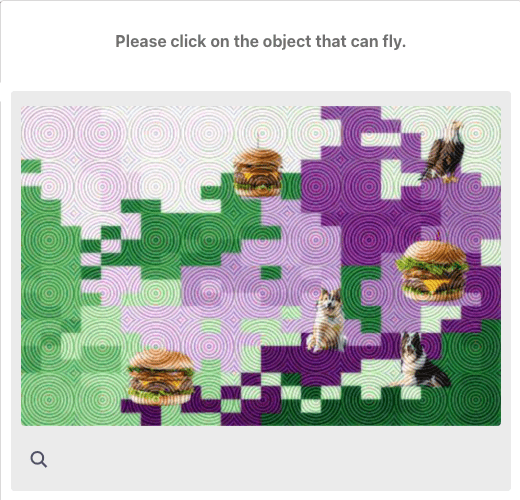
hCaptcha Image เป็นประเภทแคปช่าที่กำหนดให้ผู้ใช้ระบุและเลือกรูปภาพตามข้อกำหนด คลิกจุด หรือลากรูปภาพ
🖼️
hCaptcha Token ถูกใช้อย่างแพร่หลายบนเว็บไซต์หลายแห่ง เช่น Cloudflare, Discord, OpenSea และบริการอื่นๆ อีกมากมายเพื่อป้องกันบอท
1. สร้างงาน
คำขอ
POST https://api.achicaptcha.com/createTask
พารามิเตอร์
| ชื่อพารามิเตอร์ | ชนิดข้อมูล | จำเป็น? | คำอธิบาย |
|---|---|---|---|
clientKey | string | ใช่ | คีย์ API |
task.type | string | ใช่ | HCaptchaImageTask |
task.subType | string | ใช่ | ค่าเท่ากับ 0 |
task.image | string | ใช่ | รายการรูปภาพ base64 คั่นด้วย |base64_question1|base64_question2|...|base64_question9|base64_sample1|base64_sample2|...|base64_sampleNหมายเหตุ: รูปภาพตัวอย่างอาจมีหรือไม่มีก็ได้ รูปภาพต้องได้รับการเข้ารหัสเป็น base64 |
task.other | string | ใช่ | คำถาม|จำนวนรูปภาพ|ประเภทแคปช่า ตัวอย่าง: "Please identify and click on all pictures featuring a bird|9|grid"- คำถาม: "Please identify and click on all pictures featuring a bird" - จำนวนรูปภาพ: 9 (นับเฉพาะรูปภาพในกริด question ไม่รวมรูปภาพ sample)- ประเภทแคปช่า: grid (เลือกเซลล์ใน 9 เซลล์ที่ตรงตามเงื่อนไข) หรือ bbox (คลิกหนึ่ง/หลายจุดหรือลากเพื่อทำเครื่องหมายวัตถุที่ตรงตามเงื่อนไข) หรือ drag (ลากชิ้นส่วนจิ๊กซอว์หนึ่ง/หลายชิ้นเพื่อสร้างรูปภาพที่สมบูรณ์) |
ตัวอย่างคำขอ
POST /createTask HTTP/1.1
Host: api.achicaptcha.com
Content-Type: application/json

{
  "clientKey": "YOUR_API_KEY",
  "task": {
    "type": "HCaptchaImageTask",
    "subType": "0",
    "image": "iVBORw0KGgoAAAANSUhEUgAAAAEAAAABCAYAAAAfFcSJAAAADUlEQVR42mNk+M9QDwADhgGAWjR9awAAAABJRU5ErkJggg==|iVBORw0KGgoAAAANSUhEUgAAAAEAAAABCAYAAAAfFcSJAAAADUlEQVR42mNk+M9QDwADhgGAWjR9awAAAABJRU5ErkJggg==|...(9 base64 images joined by |)",
    "other": "Please identify and click on all pictures featuring a bird|9|grid"
  }
}
การตอบกลับ
เมื่อสำเร็จ เซิร์ฟเวอร์จะส่งคืน errorId = 0 และ taskId
{
  "errorId": 0,
  "taskId": "f2fc70d6-c76b-4fba-9480-205ac1fe9fb9"
}
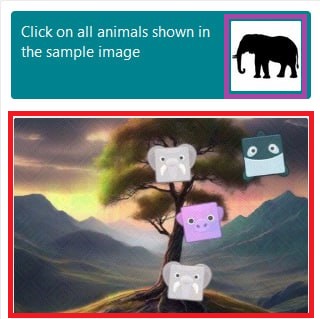
ตัวอย่างรูปภาพที่ส่งไปยังเซิร์ฟเวอร์แก้แคปช่า
เคล็ดลับ: เพื่อให้ได้คุณภาพการรู้จำแคปช่าที่ดีที่สุด กรุณาครอปรูปภาพตามกรอบสีแดงและม่วงในตัวอย่างด้านล่าง
ตรวจสอบให้แน่ใจว่ารูปภาพที่ครอปมีความละเอียดอย่างน้อย 500–600 พิกเซล ทั้งด้านกว้าง/สูง เพื่อให้ได้ผลลัพธ์ที่ดีที่สุด
2. รับผลลัพธ์
คำขอ
POST https://api.achicaptcha.com/getTaskResult
พารามิเตอร์
| ชื่อพารามิเตอร์ | ชนิดข้อมูล | จำเป็น? | คำอธิบาย |
|---|---|---|---|
clientKey | string | ใช่ | คีย์ API |
taskId | string | ใช่ | TaskId ที่ได้รับจาก (1) |
ตัวอย่างคำขอ
POST /getTaskResult HTTP/1.1
Host: api.achicaptcha.com
Content-Type: application/json

{
  "clientKey": "YOUR_API_KEY",
  "taskId": "f2fc70d6-c76b-4fba-9480-205ac1fe9fb9"
}
การตอบกลับ
{
  "errorId": 0,
  "status": "ready",
  // solution: พิกัดของจุดที่จะคลิก (x1,y1,x2,y2,...)
  "solution": "20,30,40,50"
}
คำอธิบายสถานะ
errorId = 0และstatus = ready: แก้ไขสำเร็จ อ่านผลลัพธ์ในsolution.gRecaptchaResponseerrorId = 0และstatus = processing: กำลังแก้แคปช่า รอ 2 วินาทีแล้วลองอีกครั้งerrorId > 0: ข้อผิดพลาดของระบบ ส่งคืนรหัสข้อผิดพลาดและคำอธิบาย
ตัวอย่างการรวมระบบ
import requests
import time
import base64

def image_url_to_base64(url):
    """Convert image URL to base64"""
    response = requests.get(url)
    return base64.b64encode(response.content).decode('utf-8')

def solve_hcaptcha_image(image_base64_list, question, image_count, captcha_type, api_key='YOUR_API_KEY'):
    # Step 1: Create task
    create_task_url = 'https://api.achicaptcha.com/createTask'
    create_task_payload = {
        'clientKey': api_key,
        'task': {
            'type': 'HCaptchaImageTask',
            'subType': '0',
            'image': image_base64_list,
            'other': f'{question}|{image_count}|{captcha_type}'
        }
    }

    response = requests.post(create_task_url, json=create_task_payload)
    result = response.json()

    if result['errorId'] != 0:
        raise Exception(result['errorDescription'])

    task_id = result['taskId']

    # Step 2: Get result
    get_result_url = 'https://api.achicaptcha.com/getTaskResult'

    while True:
        time.sleep(2)  # Wait 2 seconds

        get_result_payload = {
            'clientKey': api_key,
            'taskId': task_id
        }

        response = requests.post(get_result_url, json=get_result_payload)
        result = response.json()

        if result['errorId'] != 0:
            raise Exception(result['errorDescription'])

        if result['status'] == 'ready':
            return result['solution']['gRecaptchaResponse']

        # If status == 'processing', continue loop

# Usage
# Convert image URLs to base64
image_urls = [
    'https://example.com/image1.jpg',
    'https://example.com/image2.jpg',
    # ... other images
    'https://example.com/image9.jpg'
]

base64_images = [image_url_to_base64(url) for url in image_urls]
image_base64_list = '|'.join(base64_images)

question = 'Please identify and click on all pictures featuring a bird'
image_count = 9
captcha_type = 'grid'  # or 'bbox'

token = solve_hcaptcha_image(image_base64_list, question, image_count, captcha_type, 'YOUR_API_KEY')
print('hCaptcha token:', token)
รหัสข้อผิดพลาดทั่วไป
| รหัสข้อผิดพลาด | คำอธิบาย | หมายเหตุ |
|---|---|---|
| 0 | success | สำเร็จ |
| 1 | processing | กำลังประมวลผล |
| 2 | missing required fields | ขาดฟิลด์ที่จำเป็น ตรวจสอบพารามิเตอร์อีกครั้ง |
| 3 | task not supported | ไม่รองรับประเภทงาน |
| 4 | task creation failed | การสร้างงานล้มเหลว |
| 5 | client key does not exist | ไม่มีคีย์ API ตรวจสอบคีย์ API อีกครั้ง |
| 6 | insufficient account balance | ยอดเงินในบัญชีไม่เพียงพอ เติมเครดิต |
| 7 | task failed, please create a new task | งานล้มเหลว โปรดสร้างงานใหม่ |
| 8 | task ID does not exist | ไม่มี ID งาน |
แนวทางปฏิบัติที่ดีที่สุด
เพื่อให้ได้ผลลัพธ์ที่ดีที่สุดเมื่อใช้ Achicaptcha API ให้ปฏิบัติตามหลักการเหล่านี้:
1. ตรวจสอบข้อมูลอินพุต
- ตรวจสอบรายการรูปภาพก่อนส่งคำขอ
- รูปภาพต้องได้รับการเข้ารหัสเป็น base64 ก่อนส่ง
- ตรวจสอบให้แน่ใจว่ารูปแบบถูกต้อง:
base64_image1|base64_image2|...|base64_image9หรือมีรูปภาพตัวอย่างเพิ่มเติม - ตรวจสอบคำถามและประเภทแคปช่า (grid/bbox) ว่าถูกต้อง
- จำนวนรูปภาพต้องตรงกับจำนวนรูปภาพจริงในกริด
2. จัดการหลายรอบ
- hCaptcha อาจต้องแก้หลายรอบติดต่อกัน
- Achicaptcha API จัดการรอบเหล่านี้โดยอัตโนมัติ
- เวลาในการแก้อาจยาวนานกว่าแคปช่าข้อความ (15-30 วินาที)
3. ช่วงเวลาการตรวจสอบ
- รออย่างน้อย 2 วินาทีระหว่างการตรวจสอบผลลัพธ์
- อย่าสแปม API ด้วยคำขอที่ต่อเนื่องกันมากเกินไป
- ตั้งค่าการหมดเวลาเพื่อหลีกเลี่ยงลูปไม่สิ้นสุด (แนะนำ 120 วินาที)
4. ตรรกะการลองใหม่
- ใช้การลองใหม่สำหรับข้อผิดพลาดชั่วคราว เช่น
ERROR_NO_SLOT_AVAILABLE - ใช้ exponential backoff เมื่อลองใหม่
- จำกัดจำนวนการลองใหม่สูงสุด
5. ความปลอดภัยของคีย์ API
- อย่าฮาร์ดโค้ดคีย์ API ในโค้ด
- ใช้ตัวแปรสภาพแวดล้อม
- อย่าเปิดเผยคีย์ API ทางฝั่งไคลเอนต์
ลิงก์ที่มีประโยชน์: